

Introduction
At Appliquer Technologies we have seen support teams drown in repetitive tickets that could be answered from existing documentation. Deploying an AI‑driven knowledge base agent is a pragmatic way to cut that noise while keeping the human team focused on complex problems. In this guide we walk through the concrete steps required to embed an LLM‑powered assistant into a SaaS support stack, measure its impact, and stay on the right side of data‑privacy regulations.
Identify Repetitive Support Queries
The first practical step is to surface the queries that consume the most engineer time. Pull the last 90 days of tickets from your ticketing system and group them by similarity. Look for high‑frequency, low‑complexity categories such as password resets, API key generation, or onboarding checklist questions. Tag these clusters and calculate the average handling time. This baseline gives you a clear target for the AI support automation effort and a metric to compare against after deployment.
Choose the Right LLM and Retrieval System
Not all large language models are created equal for support use cases. You need a model that balances:
- Domain relevance – fine‑tuned on technical documentation or capable of few‑shot prompting with your knowledge base.
- Latency – response times under a second keep the ticket flow smooth.
- Cost predictability – token‑based pricing should align with expected query volume.
We typically pair a performant LLM (e.g., an open‑source model hosted on dedicated inference hardware) with a vector‑based retrieval engine such as Pinecone or a self‑hosted Milvus cluster. The retrieval layer indexes your knowledge base documents as embeddings, enabling semantic search that surfaces the most relevant passages even when the user phrasing varies.
Prompt Design for the Knowledge Base Agent
Prompt engineering is where the rubber meets the road. A well‑crafted prompt guides the LLM to produce concise, accurate answers and to stay within the bounds of your support policies. A practical pattern looks like:
You are a support assistant for [Product Name]. Use only the provided knowledge snippets. Answer in no more than three sentences. If the answer is not in the snippets, respond with "I don't have enough information; let me connect you with a human."
[Relevant snippets]
User question: [Ticket text]
Answer:
Keep the prompt short, inject the retrieved snippets directly, and enforce a fallback clause. This approach reduces hallucinations and makes the system safe for production.
Integrate with Existing Ticket System
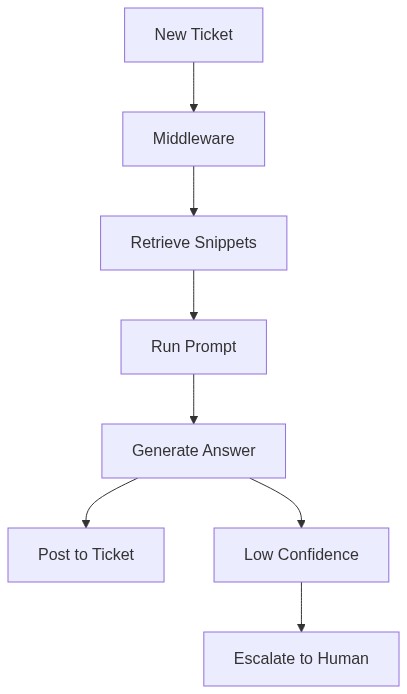
Integration can be achieved through a webhook or API middleware that intercepts new tickets, runs the retrieval‑prompt pipeline, and posts the AI‑generated reply back into the ticket thread. The middleware should also tag the ticket with a flag (e.g., auto‑responded) so downstream analytics can separate AI‑handled cases from human‑handled ones.
Measure ROI
After the agent is live, track three core metrics:
- Ticket deflection rate – proportion of tickets answered entirely by the AI.
- Average handling time reduction – compare pre‑ and post‑deployment timestamps for deflected tickets.
- Customer satisfaction – use post‑resolution surveys or CSAT scores on AI‑handled tickets.
Combine these with the cost of inference (compute + storage) to calculate a net ROI. Remember that the goal is incremental improvement, not a sudden 100 % drop in volume.
Edge Cases and Human Oversight
Even a well‑tuned model will encounter ambiguous or novel issues. Implement a confidence threshold based on token log‑probabilities or a simple rule such as “no relevant snippets found.” When the threshold is not met, route the ticket to a human agent automatically. Maintain a dashboard that shows escalation rates so you can fine‑tune the prompt or enrich the knowledge base over time.
Data Privacy and Compliance
Support tickets often contain personally identifiable information (PII) or regulated data. To stay compliant:
- Mask PII before sending the ticket text to the LLM. Simple regexes for email, credit‑card patterns, or custom data‑loss prevention tools work well.
- Run the model in a VPC or on‑premise hardware if your contract forbids cloud‑based processing of raw data.
- Log all AI interactions for audit trails and to satisfy GDPR or CCPA requests.
By treating the LLM as a stateless processor that never persists raw user data, you mitigate most privacy risks while still delivering fast answers.
Summary
Deploying an AI support automation layer is a series of disciplined steps: surface repetitive tickets, pick a suitable LLM and retrieval engine, craft safe prompts, hook into your ticketing workflow, and continuously measure impact. Edge‑case handling and privacy safeguards are non‑negotiable; they keep the system trustworthy and compliant. With this roadmap, CTOs and product managers can reduce support load without sacrificing quality, freeing engineering resources for higher‑value work.